ConceptData and governance
External tables and catalog-managed Delta tables
Who owns a table's files and who decides its latest version, how a catalog-managed Delta table is created and committed through the Delta API, and why path-based access isn't a substitute.
Unity Catalog knows two kinds of table. They differ in two things: who owns the files, and who decides which version of the table is the current one. This page explains both kinds, what the server does for a catalog-managed Delta table, and which engines can use each kind.
Two questions decide the kind
Who owns the files? An external table points at a location that someone else chose and controls. The catalog records the table's name, columns, format, and location, and never moves or deletes the files. A managed table lives at a location the catalog chooses, under the storage root of its schema or catalog. The catalog creates that location, and deletes it when the table is dropped.
Who decides the latest version? A Delta table is a series of numbered
commits in its _delta_log. For an external table, the files decide: whichever
writer manages to put commit file N in place first has made version N, and
the catalog plays no part. For a catalog-managed Delta table, the catalog
decides. A writer proposes commit N, and it becomes the table's version N
only once the server accepts it.
In Unity Catalog the two answers go together. Managed tables are always Delta, and a client that creates one through the Delta API, such as Spark with Delta 4.3 or later, makes it catalog-managed. External tables never are.
| External table | Managed (catalog-managed Delta) table | |
|---|---|---|
| Location | You supply it | The catalog allocates it |
| Who accepts commits | The files, first writer wins | The Unity Catalog server |
| Formats | Delta, Parquet, CSV, and others | Delta only |
| Dropping the table | Removes the catalog entry, keeps the files | Deletes the files too, after a cleanup delay |
| Path-based clients | Can read and write the location | Can't load it without the catalog |
| How to create one | Register it | CREATE TABLE without a location |
Why a catalog should accept commits
When the files decide, the storage system has to resolve races between writers, and every guarantee follows from that one atomic file operation. That has worked for years, but it leaves the catalog as a bystander. The catalog can't reject a commit that breaks a rule, can't see a commit before it lands, and can't coordinate changes across tables.
When the catalog accepts commits, it becomes the table's source of truth. Two writers that race for the same version get one acceptance and one rejection, whatever the storage system offers. The catalog can require table features, such as deletion vectors or in-commit timestamps, before a table may exist. A reader asks the catalog for the latest version instead of listing files.
Delta records this arrangement in the table itself as the catalogManaged
table feature. The
Delta protocol
requires every client that reads or writes such a table to ask the catalog.
The lifecycle through the Delta API
The server speaks to Delta clients through the Delta API, a versioned REST
interface under /api/2.1/unity-catalog/delta/v1/. Its
managed-tables protocol
defines each step. Expand the diagram and step through it:
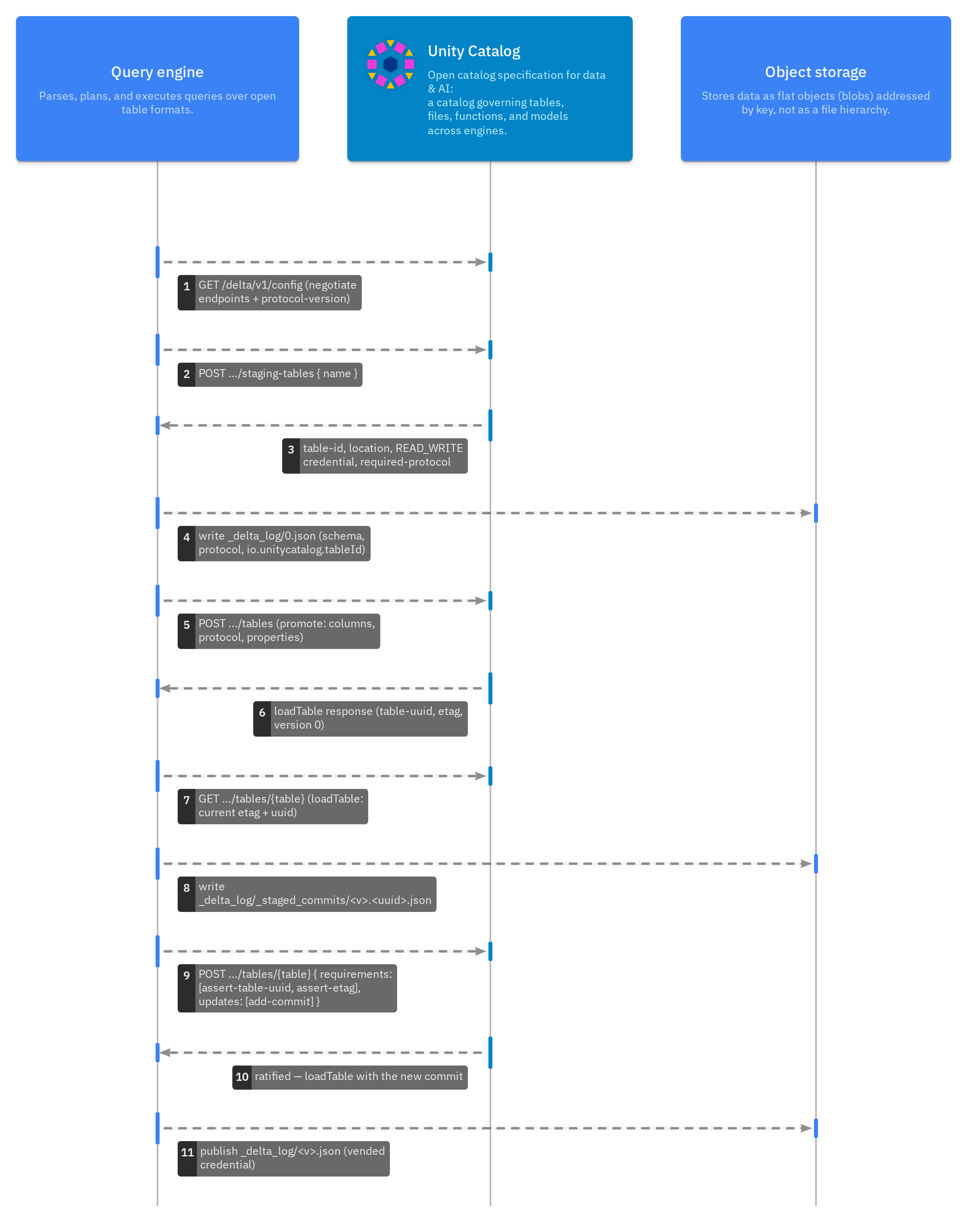
The lifecycle has four parts.
-
Negotiate. The client asks
GET /delta/v1/configwhich endpoints and which protocol version the server supports. The server answers with the endpoints it implements and protocol version1.0. -
Stage. To create a table, the client asks for a staging table. The server picks the location, issues a read-write credential for it, and states the Delta protocol the table must use. The server answers like this:
{
  "table-type": "MANAGED",
  "location": "file:///tmp/uc-docs/managed/__unitystorage/catalogs/<catalog-id>/tables/<table-id>",
  "required-protocol": {
    "min-reader-version": 3,
    "min-writer-version": 7,
    "reader-features": ["catalogManaged", "v2Checkpoint", "vacuumProtocolCheck", "deletionVectors"],
    "writer-features": ["catalogManaged", "v2Checkpoint", "vacuumProtocolCheck", "deletionVectors", "inCommitTimestamp"]
  },
  "suggested-protocol": {
    "reader-features": ["columnMapping"],
    "writer-features": ["columnMapping", "domainMetadata", "rowTracking"]
  }
}
The response also lists the matching required and suggested table properties. The client writes version 0 of the Delta log at that location, then asks the server to turn the staging table into a real one.
-
Commit. For each change, the client writes the new data files and a commit file under
_delta_log/_staged_commits/, named with the version and a random ID. It then sends one request that names the commit and the conditions under which to accept it, for example that the table is still the one it loaded. The server checks the conditions and accepts or rejects the commit as a whole. -
Load. A reader asks the server for the table. The response includes the latest accepted version and the recent commits, so the reader knows exactly which files make up the table.
Throughout, the server hands out storage credentials scoped to the table's location, so no client needs standing access to the whole bucket. See Credential vending for that trust boundary.
What clients must support
Because the protocol lives in the table, a client that doesn't speak it can't
use the table at all, not even to read it. Unity Catalog gives a path-based
client nothing to work with: delta-rs 1.6.6, pointed at a managed
table's location, stops with
Max catalog version is required when loading a catalog-managed table. That
refusal is deliberate. A client that only lists files could miss commits the
catalog has accepted, or write a version the catalog never approved.
So for a managed table, choose a client that goes through the catalog. These
include Spark with the Unity Catalog connector and Delta 4.3 or
later, and DuckDB's unity_catalog extension for reads and appends.
An external table makes the opposite trade. Any client with access to the storage can read and write it, including tools that have never heard of Unity Catalog. That suits data that another system already owns. But the catalog can't coordinate those writers, and its record of the columns can fall out of step with the files.
What each client can do with a table, as tested in CI:
| Operation | Spark 4.1 | DuckDB | Polars | Daft | pandas | PyIceberg | uc CLI 0.7 | Python SDK 0.7 |
|---|---|---|---|---|---|---|---|---|
| List tables | ✓ | ✓ | ✓ | ✓ | ✗ | — | ✓ | — |
| Read an external table | — | ✓ | ✓ | ✓ | ✓ | — | — | — |
| Read with vended S3 credentials | — | — | ✓ | — | ✓ | — | — | — |
| Append to an external table | — | — | ✓ | ✗ on local storage | ✓ | — | — | — |
| Create a managed table | ✓ | ✗ | — | — | — | — | — | — |
| Read a managed table | ✓ | ✓ | ✗ | ✗ | ✗ | — | — | — |
| Append to a managed table | ✓ | ✓ | ✗ | ✗ on local storage | ✗ | — | — | — |
| Update rows in a managed table | ✓ | ✗ | — | — | — | — | — | — |
| Delete rows from a managed table | ✓ | ✗ | — | — | — | — | — | — |
| Drop a managed table | ✓ | ✗ | — | — | — | — | — | — |
| Read an earlier version of a managed table | ✓ | — | — | — | — | — | — | — |
| Write to a managed table by path | — | — | ✗ | ✗ | ✗ | — | — | — |
| Change a managed table's columns | — | — | ✗ | ✗ | ✗ | — | ✗ | ✗ |
| Set a managed table's properties | — | — | ✗ | ✗ | ✗ | — | ✗ | ✗ |
| Create a managed table from a query | ✓ | ✗ | — | — | — | — | — | — |
| Replace a managed table | ✓ | — | — | — | — | — | — | — |
| Overwrite a managed table | ✓ | — | — | — | — | — | — | — |
| Replace rows that match a condition | ✓ | — | — | — | — | — | — | — |
| Overwrite partitions of a managed table | ✓ | — | — | — | — | — | — | — |
| Read a Parquet, CSV, or JSON table | — | ✓ by path from the table's location | ✓ by path from the table's location | — | — | — | — | — |
| Create a managed Iceberg table | ✓ | ✓ | — | — | — | ✓ | — | — |
| Append to an Iceberg table | ✓ | ✓ | — | — | — | ✓ | — | — |
| Read an Iceberg table | ✓ | ✓ | — | — | — | ✓ | — | — |
| Update rows in an Iceberg table | ✓ | ✓ | — | — | — | ✓ | — | — |
| Delete rows from an Iceberg table | ✓ | ✓ | — | — | — | ✓ | — | — |
| Rename an Iceberg table | ✓ | ✓ | — | — | — | ✓ | — | — |
| Drop an Iceberg table | ✓ | ✓ | — | — | — | ✓ | — | — |
| Join Delta and Iceberg tables | ✓ UC connector and Iceberg REST catalogs in one session | — | — | — | — | — | — | — |
| Merge into an Iceberg table | ✓ | — | — | — | — | — | — | — |
| Move an Iceberg table to another schema | ✗ | ✗ | ✗ | ✗ | — | ✗ | — | — |
| Read a Delta table as Iceberg | ✗ | ✗ | — | — | — | ✗ | — | — |
| Register an existing Iceberg table | ✗ | ✗ | ✗ | ✗ | — | ✗ | — | — |
| Commit to several tables at once | ✗ | ✗ | ✗ | ✗ | — | ✗ | — | — |
| Create and query Iceberg views | ✗ | ✗ | ✗ | ✗ | — | ✗ | — | — |
| Plan scans on the server | ✗ | ✗ | ✗ | ✗ | — | ✗ | — | — |
| Sign storage requests through the catalog | ✗ | ✗ | ✗ | ✗ | — | ✗ | — | — |
| Register an external Delta table | — | — | — | — | — | — | ✓ | ✓ |
| Register a Parquet, CSV, or JSON table | — | — | — | — | — | — | ✓ | ✓ |
| View a table | — | — | — | — | — | — | ✓ | ✓ |
| Read a table's rows from a client | — | — | — | — | — | — | ✓ | ✓ with deltalake |
| Write sample rows | — | — | — | — | — | — | ✓ | — |
| Drop a table | — | — | — | — | — | — | ✓ | ✓ |
When to use which
Use a managed table when Unity Catalog should own the data. You get a location nobody has to plan, commits that the catalog checks, and clean deletion.
Use an external table when the data already exists, when another system writes it, or when it isn't in Delta format. Registering such a table gives it a governed name without changing who writes it.
Further reading
- Create and update a catalog-managed Delta table walks the lifecycle above with Spark.
- Core concepts explains storage roots and how managed locations are inherited.
- The Delta API specification defines every endpoint and field.