GuideUse Unity CatalogVolumes and files
Use volumes as marimo remote storage
Open a Unity Catalog volume as an obstore store in a marimo notebook, so its files show in the Remote Storage panel and cells read them with vended credentials.
marimo shows any obstore store a notebook defines in its Remote Storage panel, where you browse and download the store's files. Open a volume as an obstore store whose credentials come from Unity Catalog, and the panel and your cells read the volume with credentials scoped to it. No storage keys go in the notebook.
Open a notebook
Start marimo with the SDK and obstore:
uv run --with unitycatalog-client==0.7.0 --with obstore==0.11.1 --with marimo==0.25.1 marimo edit notebook.pyIn the first cell, import the clients and point the configuration at your server:
import asyncio
import threading
from datetime import UTC, datetime

import obstore
from obstore.store import from_url
from unitycatalog.client import (
    ApiClient,
    Configuration,
    GenerateTemporaryPathCredential,
    GenerateTemporaryTableCredential,
    GenerateTemporaryVolumeCredential,
    PathOperation,
    TableOperation,
    TablesApi,
    TemporaryCredentialsApi,
    VolumeOperation,
    VolumesApi,
)

config = Configuration(host="http://localhost:8080/api/2.1/unity-catalog")
Add the credential provider
The Remote Storage panel lists files with obstore's sync methods and downloads them with its async ones, so the store needs a provider that serves both. In a cell, define the provider from Use Unity Catalog credentials with obstore:
class UnityCatalogCredentials:
    """An obstore credential provider that asks Unity Catalog for storage credentials.

    It returns whichever credential the server vends: S3 keys, an Azure SAS
    token, or a Google Cloud OAuth token. `request` is an async function that
    takes an `ApiClient` and returns the server's `TemporaryCredentials`. It
    runs on an event loop of its own, in a background thread, so obstore can
    call the provider from sync methods, async methods, and threads without a
    loop alike.
    """

    def __init__(self, config, request):
        self._request = request
        self._loop = asyncio.new_event_loop()
        threading.Thread(target=self._loop.run_forever, daemon=True).start()
        self._api = self._run(self._connect(config))
        # The first answer gives the store its URL, and a missing grant fails here.
        self._first = self._run(request(self._api))
        self.url = self._first.url

    @classmethod
    def for_volume(cls, config, name, operation=VolumeOperation.READ_VOLUME):
        async def request(api):
            volume = await VolumesApi(api).get_volume(name=name)
            return await TemporaryCredentialsApi(
                api
            ).generate_temporary_volume_credentials(
                GenerateTemporaryVolumeCredential(
                    volume_id=volume.volume_id, operation=operation
                )
            )

        return cls(config, request)

    @classmethod
    def for_table(cls, config, full_name, operation=TableOperation.READ):
        async def request(api):
            table = await TablesApi(api).get_table(full_name=full_name)
            return await TemporaryCredentialsApi(
                api
            ).generate_temporary_table_credentials(
                GenerateTemporaryTableCredential(
                    table_id=table.table_id, operation=operation
                )
            )

        return cls(config, request)

    @classmethod
    def for_path(cls, config, url, operation=PathOperation.PATH_READ):
        async def request(api):
            return await TemporaryCredentialsApi(
                api
            ).generate_temporary_path_credentials(
                GenerateTemporaryPathCredential(url=url, operation=operation)
            )

        return cls(config, request)

    @staticmethod
    async def _connect(config):
        return ApiClient(config)

    def _run(self, coroutine):
        return asyncio.run_coroutine_threadsafe(coroutine, self._loop).result()

    def __call__(self):
        creds = self._first or self._run(self._request(self._api))
        self._first = None
        # expiration_time is in epoch milliseconds.
        expires_at = datetime.fromtimestamp(creds.expiration_time / 1000, tz=UTC)
        if aws := creds.aws_temp_credentials:
            return {
                "access_key_id": aws.access_key_id,
                "secret_access_key": aws.secret_access_key,
                "token": aws.session_token,
                "expires_at": expires_at,
            }
        if azure := creds.azure_user_delegation_sas:
            return {"sas_token": azure.sas_token, "expires_at": expires_at}
        if gcp := creds.gcp_oauth_token:
            return {"token": gcp.oauth_token, "expires_at": expires_at}
        raise ValueError(f"the server vended no credential for {creds.url}")

    def close(self):
        self._run(self._api.close())
        self._loop.call_soon_threadsafe(self._loop.stop)
Open the volume
In a new cell, ask for read credentials on the volume and open a store on its storage location:
credentials = UnityCatalogCredentials.for_volume(config, "analytics.ops.files")
files = from_url(
    credentials.url, region="us-east-1", credential_provider=credentials
)
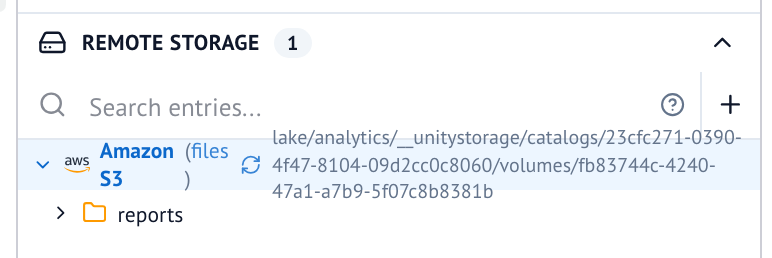
When the cell runs, files appears under Remote Storage in the Files
panel. Expand it to browse the volume's files, and download one from its
menu.
for_volume asks for READ_VOLUME, which lets the store list and read, and
storage rejects its writes. To write from cells, pass
VolumeOperation.WRITE_VOLUME, which needs ownership of the volume.
Read a file in a cell
Cells read through the same store:
report = obstore.get(files, "reports/2026-10.csv").bytes()
print(bytes(report).decode())
obstore renews the credential once less than five minutes are left, so the store keeps working while the notebook stays open. Each renewal asks the server again, so a revoked grant stops it.
Next steps
- Use Unity Catalog credentials with obstore to open table files and see how the provider renews credentials.
- Manage volumes to create the volume and grant
READ VOLUME. - Call a function in a marimo notebook to run catalog functions from the same notebook.